Last Updated: June 2023
It is best practise to have a project contingency in the value of the contract price. Most builders do but is absorbed over the life of the project. As the key feature of being a C2CPRO, all items are transparent in the Final Cost Report, including the contingency.
Should there be a cost increase to any quoted items, due to unforeseen circumstances in relation to Suppliers or Trade Contractors, the contingency sum the Principal Contractor has provided for will be applied to offset any cost overruns for the quoted items.
If the Principal Contractor is able to deliver the contract below the allocation of costs the Project Owner will receive the savings the security account for those works at the completion of the Contract. It is also suggested to create a Clients Prime Cost Item Contingency with a small amount applied. The reason for this is that if the client makes savings along the way with their prime cost items, the savings can be allocated to the Clients Prime Cost Item Contingency, and then can be accessed for any other prime cost items of their choice.
Step 1 Select the Job, select Estimates and select the estimate you are working on (ie. Primary Estimate).
Step 2 Select Master Cost Assembly.

Step 3 Select Project Specials Trade Area.
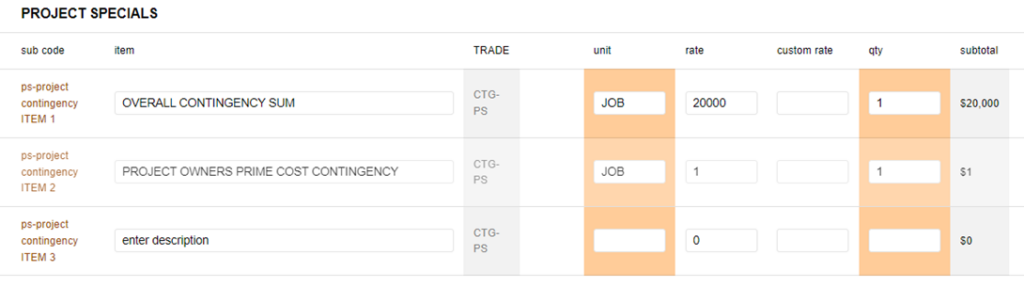
Step 4 Add the appropriate amount for the Overall Contingency Sum.
Step 5 Add $1 to the Project Owners Prime Cost Contingency line, so that this will show up in the Cost Summary and the savings made can be applied to this line item during construction and when doing the Claims.
Refer Variations to allocate funds to the Contingency Sums.
Still Need Help? Please contact the team at C2CPRO via email at admin@c2cpro.com.au or book a call to schedule a dedicated time with one of the team.