Last Updated: July 2023
The Cost Summary is a read-only version of the Master Cost Assembly, reflecting all the data at each Trade Area. This is where you will refer to the allowances within the contract price to make sure the project is on track and within budget.
Select the Job and select Cost Summary from the ribbon at the top.

As the project moves along, you will see any Variations added, the Paid to Date, and the Balance. If at any time the client requests an update of the project, you can download a report by selecting reports at the top right and selecting Cost Summary Report.
Using the Concrete Works as the example, you can see where Claim 1 was applied, showing the Paid to Date, the Balance, and the Percent Complete.
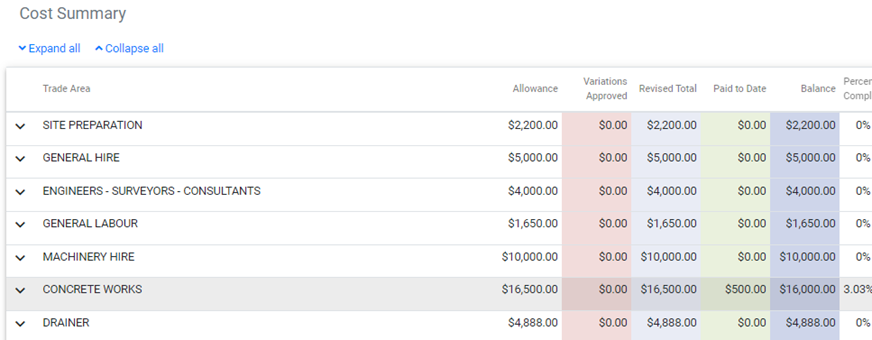
If you expand the Trade Area you will see the details of the line items.

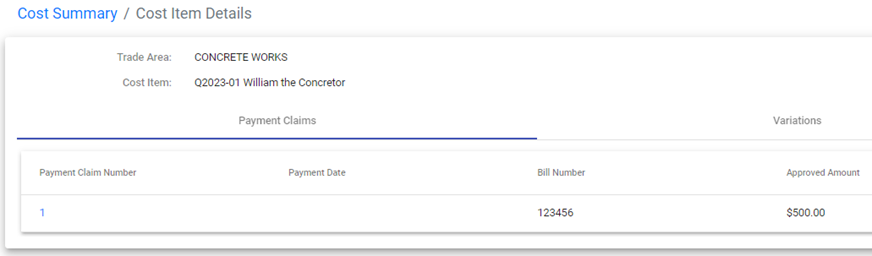
If you select one the line items, it will direct you to details of which Claim the line item was claimed at.
Still Need Help? Please contact the team at C2CPRO via email at admin@c2cpro.com.au or book a call to schedule a dedicated time with one of the team.