Last Updated: June 2023
Throughout the MCA, you will see that there are codes applied to each line item. This is to allocate total sums for the types of codes when reporting. In the cost reports, you will note that each line item has a Cost Description, showing if it is a Prime Cost item or a Provisional Sum item or if it is a Quoted Item.
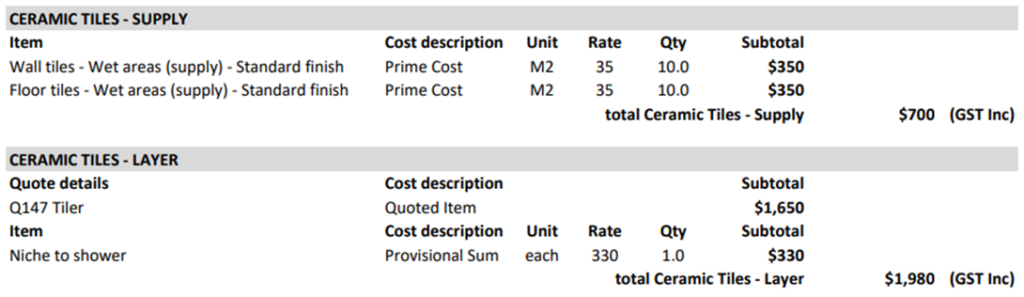
At the bottom of the Cost Report there is a summary of the Quoted, Provisional and Prime Cost Items. So as the codes change, this summary will change.

When an item is placed at the Quoted Items section in the Trade Area, the code will automatically change to ‘Quoted’. Codes can only be edited at Construction Manager – Project Costs and Contract Administration.
Step 1 Select the Job, select Estimates and select the estimate you are working on (ie. Primary Estimate).
Step 2 Select Master Cost Assembly.

Step 3 Select Construction Manager – Project Costs Trade Area. Select Edit. Note the Code at Management Fee is CMF-PS.

Step 4 To make this a Quoted Item, change the PS to Q. Save.

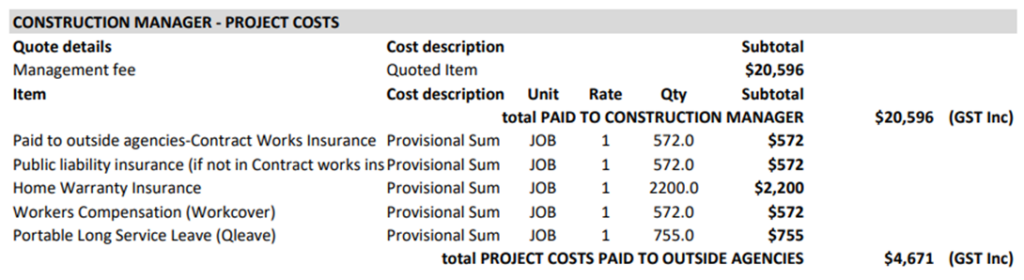
Step 5 Viewing the Cost Report, the line item is now a Quoted Item. All other items in Construction Manager – Project Costs and Contract Administration Trade Areas can have their Code edited.
Still Need Help? Please contact the team at C2CPRO via email at admin@c2cpro.com.au or book a call to schedule a dedicated time with one of the team.