Last Updated: November 2023
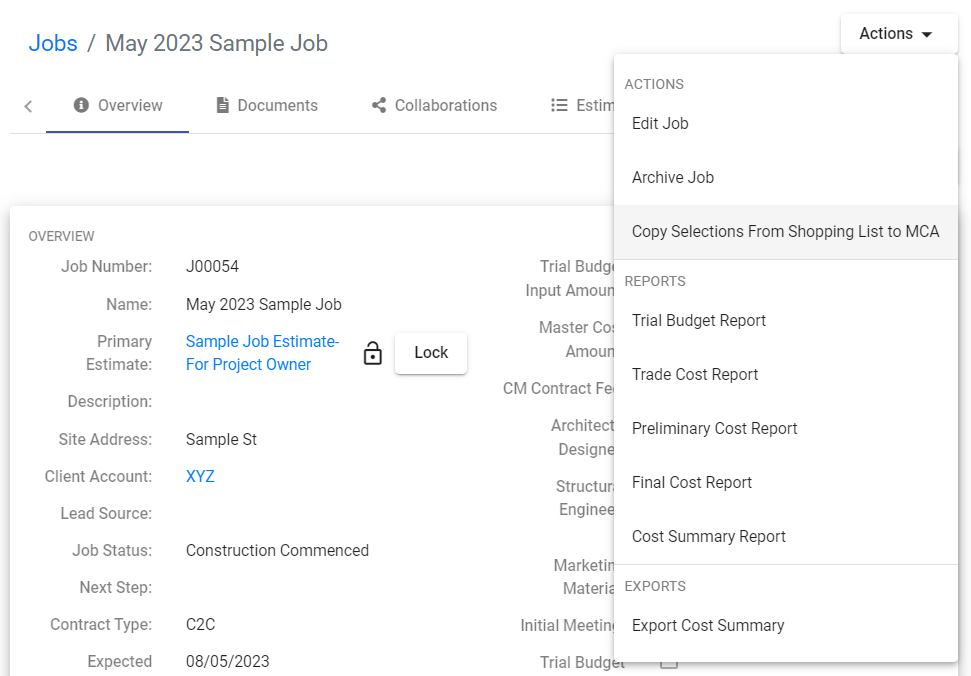
PDF reports of the Estimates can be downloaded from the Job Overview. The following are the types of reports and their assigned use:
- Trial Budget Report
- Trade Cost
- Preliminary Cost Report
- Final Cost Report
- Cost Summary Report
To download a report follow these steps:
Step 1 Access the Job, ensuring the correct Estimate is the Primary Estimate.
NOTE: remember to Lock the Estimate to remove the Draft watermark on the reports.
Step 2 At Overview tab, select the Actions dropdown
Step 3 Select the report required.
Trial Budget Report
The Trial Budget Report is one of the first reports you will use in C2CPRO. It outlines the items considered for the project based on the data entered at the Xplorer and Discovery. It is based on Provisional Sum and Prime Cost items, with only the cost estimate being shown for the Prime Cost items. At the lower section of the report, you will find a summary of the data entered in the Discovery. This information can be used by a designer or architect as a basis for the client brief to maintain the project owner’s expected budget at design stage.
Trade Cost Report
The Trade Cost Report is used as supporting documentation at Contract stage. The report outlines the items under the coded areas of Quoted items, Provisional Sum items and Prime Cost items, showing the total sum of each coded area in the report.
Preliminary Cost Report
When you use the Master Cost Assembly to create a detailed Estimate, a Preliminary Cost Report is used at the initial stages as it only outlines the detailed costs for Prime Cost items, Provisional Sum items, whilst waiting for quotes from Trades and Suppliers, are still hidden, similar to the Trial Budget Report.
Final Cost Report
This report shows all items and their associated costs from the Master Cost Assembly detailed Estimate. This is typically used when you are ready to present a contract price to the client.
Cost Summary Report
This report is used during construction and shows data from the Cost Summary and Claims Summary. As you progress through the project and apply Bills to Claims, you can download this report to view
Still Need Help? Please contact the team at C2CPRO via email at admin@c2cpro.com.au or book a call to schedule a dedicated time with one of the team.