Last Updated: July 2023
The Contingency Sum is an allowance made to the contract price for any potential unforseen over runs to Quoted items. The Contingency Sum is not to be used for the selection or upgrade of any Prime Cost Items, only for Quoted Items.
Where savings are made at Provisional Sum and Quoted items, these remaining funds are to be allocated to the Contingency Sum during the life of the contract.
As you make Claims, the line items will have their Percent Complete updated. If you find that the allocation for items are fully claimed and set to 100% and there is an allowance remaining, these allowances are to be transferred to the Contingency Sum (Project Specials Trade Area). To transfer the funds to the Contingency, a Variation is to be created.
Step 1 Select Variations (refer Variations) and create the Variation, outlining the reason for the Variation, being Transfer to Contingency Sum.
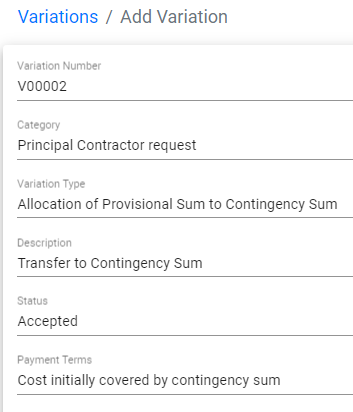
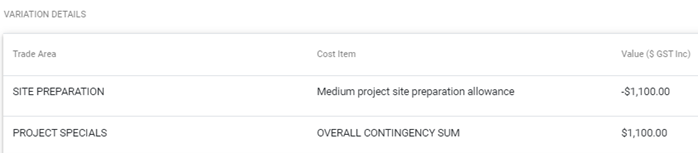
Step 2 Then add the Variation Details. As you are transferring the funds allowances from one Trade Area to move to the Contingency, you will nominate the Value as a negative number, and you will choose the corresponding Cost Item. Then, as you are adding the funds allowance to Project Specials, you will nominate the funds as a positive number, and then choose Overall Contingency Sum as the Cost Item.
Step 3 At Cost Summary, confirm the Variation is complete.


Still Need Help? Please contact the team at C2CPRO via email at admin@c2cpro.com.au or book a call to schedule a dedicated time with one of the team.